
In unserer produktiven SCCM-Umgebung werden insbesondere die größeren Content-Pakete per Prestaging und USB-Datenträger verteilt. Dabei kann es vorkommen, das man den Überblick, welches Paket noch auf welchem Distribution-Point fehlt bzw. für welche Tasksequenzen wo noch Pakete fehlen, verloren geht.
Um dieses Problem zu lösen, habe ich ein PowerShell-Skript geschrieben. Dazu habe ich mich von Inhalten von Jason Scheffelmaer inspirieren lassen. Um das Skript nutzen zu können, benötigt man die SCCM.psm1 von Michael Niehaus.
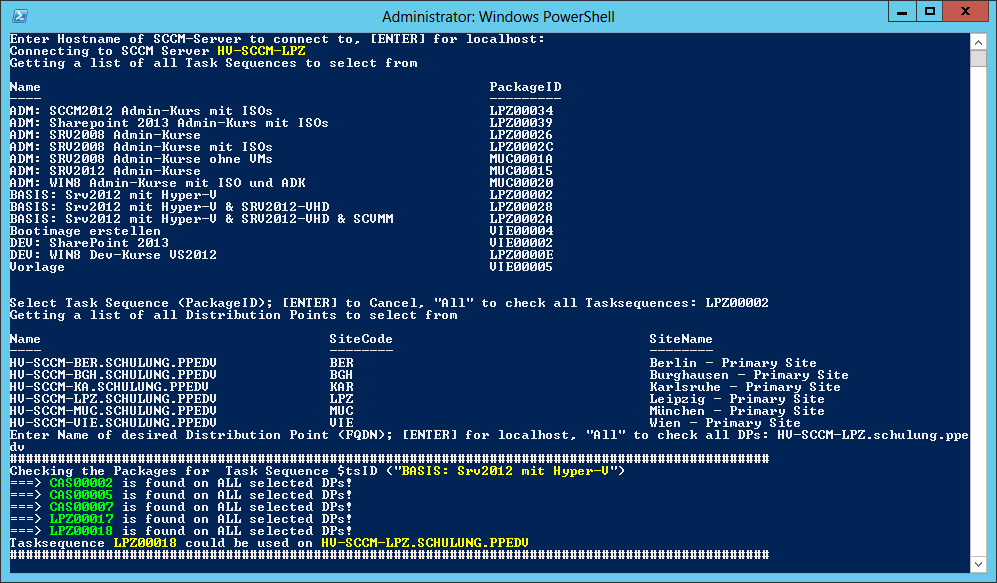
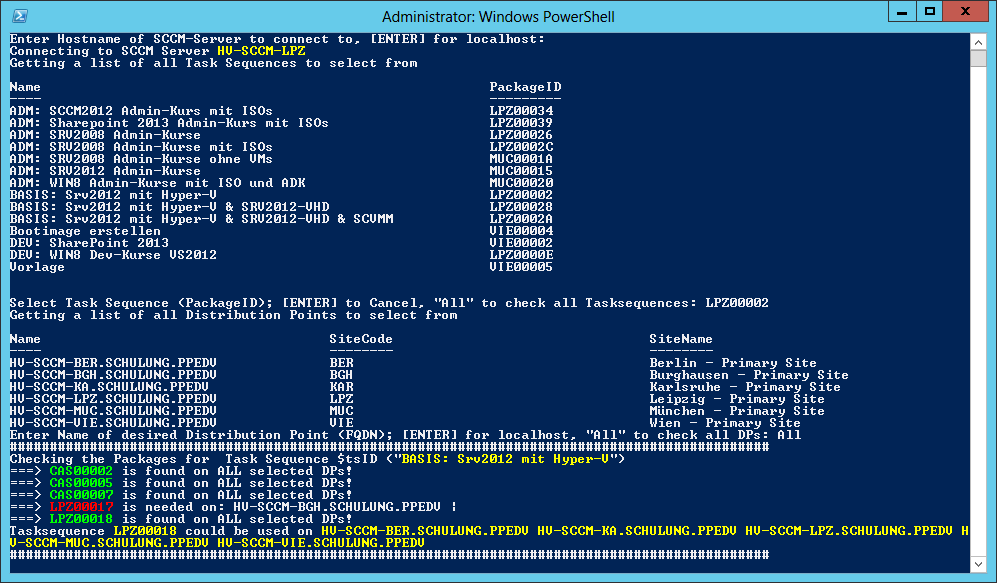
Das Skript wird ohne Parameter aufgerufen und fragt alle notwendigen Werte bei der Abarbeitung ab. Wichtig ist, dass die x86-Variante der PowerShell verwendet wird. Im Skript selber muss noch der Pfad zur SCCM.psm1 angepasst werden.
# Get-SCCMMissingTSPackages.ps1

# Author: Haiko Hertes
# Parts of the Script are taken from CheckTSPrompt.ps1 from Jason Scheffelmaer
# Needs sccm.psm1 from Michael Niehaus, tested with Version 1.5

# ------------- DISCLAIMER -------------------------------------------------
# This script code is provided as is with no guarantee or waranty concerning
# the usability or impact on systems and may be used, distributed, and
# modified in any way provided the parties agree and acknowledge the
# Microsoft or Microsoft Partners have neither accountabilty or
# responsibility for results produced by use of this script.
#
# Microsoft will not provide any support through any means.
# ------------- DISCLAIMER -------------------------------------------------

# The CheckPackages function checks each task sequence, finding all the packages
# that it references.  It then checks each appropriate DP to make sure that the
# needed packages are available on on those DPs.

function CheckPackages
{
    process
    {
        # Get the list of packages referenced by this task sequence
        $tsID = $_.PackageID
        $tsName = $_.Name

        # Setting up a Text-List of all DPs to see, which DP has all needed packages
        $DPsWithAllPackages = New-Object System.Collections.ArrayList
        foreach ($dp in $global:SelecteddpList)
        {
                $DPsWithAllPackages.Add($dp.Name)
        }

        Write-Host "###############################################################################################"
        Write-Host 'Checking the Packages for  Task Sequence $tsID ("' -NoNewLine; Write-Host $tsName -NoNewLine -ForegroundColor Yellow ; Write-Host '")'
        $tsReferences = Get-SCCMObject SMS_TaskSequenceReferencesInfo "PackageID='$tsID' and ProgramName='*'"

        # Check each package
        Write-Verbose "Checking all packages..."
        foreach ($tsPackage in $tsReferences)
        {

            # Get a list of DPs for this package
            $tsPackageID = $tsPackage.ReferencePackageID

            Write-Verbose "Checking Package: $tspackageID"
            $tsReferenceDPs = Get-SCCMObject SMS_TaskSequenceReferenceDPs "TaskSequenceID='$tsID' and PackageID='$tsPackageID'"
            $packageNeededSomeWhere = $false
            $packageNeedingDPs = New-Object System.Collections.ArrayList

            # Check each DP to see if the package is on it
            foreach ($dp in $global:SelecteddpList)
            {
                $dpSiteCode = $dp.SiteCode
                $dpName = $dp.Name
                Write-Verbose "Checking DP $dpName"
                $found = $false
                foreach ($tsDP in $tsReferenceDPs)
                {

                    if ($tsDP.ServerNALPath -eq $dp.NALPath)
                    {
                        Write-Verbose "$tsPackageID - Package Found"
                        $found = $true
                        break
                    }
                }
                if ($found)
                {
                    New-Object PSObject -Property @{SiteCode=$dpSiteCode; PackageID=($tsPackageID); ServerName=($dp.ServerName); ShareName=($dp.ShareName); NALPath=($dp.NALPath); Result="Found"}
                }
                else
                {
                    # Check to see if this DP is a PXE Service Point, and if so mark as Not Needed.
                    if ($tsPackage.ReferencePackageType -eq 258 -or (-not $dp.NALPath.Contains("SMSPXEIMAGES$")))
                    {
                        Write-Verbose "$tsPackageID - Package Not Found"
                        $packageNeededSomehere = $true
                        $packageNeedingDPs.Add("$dpName |")
                        $DPsWithAllPackages.Remove($dp.Name)
                        New-Object PSObject -Property @{SiteCode=$dpSiteCode; PackageID=($tsPackageID); ServerName=($dp.ServerName); ShareName=($dp.ShareName); NALPath=($dp.NALPath); Result="Not Found"}
                    }
                    else
                    {
                        New-Object PSObject -Property @{SiteCode=$dpSiteCode; PackageID=($tsPackageID); ServerName=($dp.ServerName); ShareName=($dp.ShareName); NALPath=($dp.NALPath); Result="Not Needed"}
                    }
                }
            }
            If ($packageNeededSomehere -eq $true)
            {
                Write-Host "===> " -NoNewLine; Write-Host "$tsPackageID" -ForegroundColor Red -NoNewline; Write-Host " is needed on: " -NoNewline; Write-Host $packageNeedingDPs
                $packageNeededSomehere = $false
            }
            else
            {
                Write-Host "===> " -NoNewLine; Write-Host "$tsPackageID" -ForegroundColor Green -NoNewline; Write-Host " is found on ALL selected DPs!"
            }
        }
        Write-Host "Tasksequence " -NoNewline; Write-Host "$tspackageID" -ForegroundColor Yellow -NoNewline; Write-Host " could be used on " -NoNewLine; Write-Host "$DPsWithAllPackages" -ForegroundColor Yellow
        Write-Host "###############################################################################################"
    }
}

# ----------
# Main logic
# ----------

# Clear screen for the script
cls

# Prompt for ConfigMgr Server Name
$ConfigMgr_Server = Read-Host "Enter Hostname of SCCM-Server to connect to, [ENTER] for localhost"
If ($ConfigMgr_Server -eq ''){$ConfigMgr_Server = hostname}
Write-Verbose "$ConfigMgr_Server is selected"

# Connect to ConfigMgr
Import-Module "D:\SOURCES\SCCM.psm1" -force
Write-Host "Connecting to SCCM Server " -NoNewLine; Write-Host $ConfigMgr_Server -ForegroundColor Yellow
New-SCCMConnection -serverName $ConfigMgr_Server

# Get the list of all task sequences to choose from via a menu
Write-Host "Getting a list of all Task Sequences to select from"
Get-SCCMTaskSequencePackage | Sort-Object Name | ft Name,PackageID

# Prompt for Task Sequence to use when checking packages
$taskSequenceName = Read-Host 'Select Task Sequence (PackageID); [ENTER] to Cancel, "All" to check all Tasksequences'
If ($taskSequenceName -eq 'Cancel' -or $taskSequenceName -eq $null)
{

    Write-Host 'No Task Sequence selected or user selected "Cancel", exiting script...'
    Exit

}
ElseIf ($taskSequenceName -eq 'All')
{
    $SelectedTS = $TaskSequences
}
Else
{
    $SelectedTS = $TaskSequences | ? {$_.Name -eq $taskSequenceName}
    $SelectedTSID = $SelectedTS.PackageID

}
$SelectedTSID = $taskSequenceName

# Get the list of all DPs to choose from via a menu
Write-Host "Getting a list of all Distribution Points to select from"
$global:dpList = Get-SCCMObject SMS_DistributionPointInfo
$DPNameList = ($global:dpList| Select-Object @{Name="Name"; Expression={$_.ServerName}}, NalPath, SiteCode, SiteName) | Sort-Object Name
($global:dpList| Select-Object @{Name="Name"; Expression={$_.ServerName}}, SiteCode, SiteName) | Sort-Object Name

# Prompt for Distribution Point to check the referenced packages against
$global:DPName = Read-Host 'Enter Name of desired Distribution Point (FQDN); [ENTER] for localhost, "All" to check all DPs'
If ($global:DPName -eq "")
{
    Write-Verbose "[ENTER] pressed, setting localhost"
    $global:DPName = ([System.Net.Dns]::GetHostByName(($env:computerName))).HostName
}

If ($global:DPName -eq 'All')
{
    Write-Verbose '"All" entered'
    $global:SelecteddpList =  $DPNameList
}
Else
{
    $global:SelecteddpList =  $DPNameList | ? {$_.Name -eq $global:DPName}
}

# Get the package status for all packages referenced
# by the task sequence selected.
# Write-Host "Calling the CheckPackages function"
If ($taskSequenceName -eq 'All')
{
    Write-Verbose '"All" entered'
    $packageResults = Get-SCCMTaskSequencePackage | CheckPackages
}
Else
{
    Write-Verbose 'Selected DP is $SelectedTSID'
    $packageResults = Get-SCCMTaskSequencePackage -filter "PackageID='$SelectedTSID'"| CheckPackages
}
Download-Link zum Skript:
www.hertes.net/wp-content/uploads/2013/06/Get-SCCMMissingTSPackages.ps1
Link zur sccm.psm1:
(Enthalten in CheckTaskSequences.zip)